Intel's Ronler Acres Plant

Silicon Forest
If the type is too small, Ctrl+ is your friend

Showing posts with label SmartPhone. Show all posts

Friday, September 27, 2024

New Samsung Galaxy Phone

Samsung Galaxy A03s
Showing both back and front

My phone died last week. I thought it was the battery so I bought a new one from Amazon for ten bucks. Then it really died. So I ordered a refurbished phone from Tracphone. I think it cost me $40. What a joyful experience.

USB Connectors
Click to embiggenate

Unlike Amazon they want $5 for overnight shipping but me being a cheapskate I told myself I can live for three days without my phone. Showed up yesterday and it needs to be activated and charged. Charging is going to take a while so let's get that started. Old charging cable doesn't work. New charging cable uses USB-c connectors on both ends. Root through my box of USB cables and they are all the old style, no new ones. Do I have anything that uses this new style connector? Hmm, how about the DOSS speaker? Ah ha! It does! Plug it in and it starts charging. Cool. Took like 12 hours to fully charge it up, but at least it works.

USB cable with C connector on one end and an A connector on the other

Check with my wife, she has all kinds of new fangled do-dads, does she have an extra cable? She does, but not of the correct flavor, so off to Amazon. I find a cable for $5. There goes the $5 I saved on shipping. I'm not going to get fast charging, but that's okay. I turn my phone off when I go to bed and plug in the charger cable, and since I'm not on my phone all friggin' day long like some people are, I should be fine.

Now for the activation. What fun. I dial up the website on my computer and click on Activate and it wants to send me a text message. That's not going to work, my old phone is dead as a doornail. No other option but the chat line, so I spend 10 or 15 minutes chatting (send a line, go play solitaire while waiting for a response, repeat) and eventually he tells me I have to find another phone and call some number. Borrow my wife's phone and call and I get a robocop who offers me options, none of which are helpful. So I start asking for an operator.

What word do you use to refer to a human? Real person? Operator? My wife says I should use 'representative', but I persisted in using 'operator' and eventually the robocop connected me to a real person. Makes me wonder how many words the robocop is able to recognize, or maybe it just gives up after a certain number of failed repetitions.

Anyway, I get connected to a real person who seems to have a handle on English, not perfect, but workable and we're going through the rigamarole of me proving I am me and he asks me for my phone's email. This flummoxed me. My phone is dead, and my phone doesn't have an email address, it has a phone number. What is he talking about? Eventually I realized he was asking about the email address connected to my Tracfone account. He sent me an email and I was able to confirm my existence and he turned on my phone.

Now we have to make sure my new phone works, so he asks me to make a phone call. That's a problem because I don't know anybody's phone numbers. So off to Google Contacts on my computer and look up some numbers, but all I get is voice mail. Everybody's busy. A couple minutes later somebody calls back, wants to know why I'm bothering them while they are at work. Tell him I'm testing my new phone. So I can make and receive phone calls. At least to one person.

Now the operator / representative / real person wants to know if I can get data. That means either audio or video, so let's pull up YouTube. Of course, everything on this phone is slightly different. It's got all the same stuff, but it's all in new places and everything works slightly differently, but eventually I get there and I've got a video playing so I think we're good.

My main uses for my phone are phone calls, text messages, and Google Maps, and those all seem to work. Since I have started using a smartphone I have found a couple other things that are useful:

  • YouTube Music
  • Bluetooth
  • Voice to text
  • Wifi
YouTube Music is not something you just use, seems you have to install the program (app in newspeak). Wandered around for a while looking for it but eventually found it and it and we're good. I haven't tried Bluetooth or Wifi yet. I'll get to it.

Voice to text works, though there is a new feature that evidently allows you to send voice recordings via the text messaging system. Some people thrive on noise, I ain't one of 'em. To get to Voice to text you have to tap on the OTHER microphone icon. It works, but when I say 'question mark' it puts in the the words 'question mark' in the message. My old phone but the question mark symbol (?). Bah, double bah and humbug. Now I gotta figure out how to change that.

Poking around on the net (using MY COMPUTER, I don't use my phone for anything except the bare essentials) I found this page:

Voice-to-text service selection

Bigger versions of the last two screens:

Page 3 Page 4

Changed to Google Voice Typing and now I can insert punctuation by naming the character.

Still haven't tried the camera.

Tuesday, June 22, 2021

Phone

I have a smartphone I got from TracFone. It's a Samsung Android phone, probably refurbished. It was really cheap, like less than $50. I buy more time when I run out. You run out in the middle of a call and they will direct you to a person who will happily take your money and credit your account some number of minutes. This usually works fine, except the one time when I really didn't want to be interrupted. I went to the doctor and thought I would let my wife listen in on my visit, but we only got about a minute into and it shunted me off to customer service. I bailed. I was probably able to give my wife a sufficiently detailed account of my visit which is why the whole incident has become remote in my memory.

Anyway, I got this smartphone. It does it's job adequately, I can make and receive phone calls. It has voice transcription, so I can dictate text messages to people. It has a stupid little onscreen keyboard where I can peck out bits of text, one character at a time. I don't like it and I don't use it unless I have to, but that's pretty seldom, thanks to the voice transcription business.

I use Google Maps occasionally, and it can be a real lifesaver. We made good use of it when my wife and I were looking for a house to buy, and I used it to locate building suppliers when we were working on the house.

I use text messaging to send reminders to my e-mail account. I sometimes use it for longer text, but I haven't quite mastered the art of dictating a blog posting. Words don't flow from my mouth the way they do from my fingers, not that they flow that well from my fingers. Even the simplest postings often have to be re-written a couple of times to make them coherent.

Lately I have been having trouble with sending text messages from my computer. It's easier for me, I've got a full size keyboard to use. It used to be a bit of a trick, but now apparently all you need to do is tack @vtext.com on to the phone number and poof, magic, it gets delivered. Except when it doesn't. A couple of messages I sent this way in the last couple of weeks fell into some kind of computer limbo. The great message handler in the cloud evidently got the messages, but wasn't able to deliver them because, shut up, that's why.

A few minutes ago I got the idea to send a group message from my phone. Evidently I still don't know how to walk like an Egyptian because I could not figure it out. Ask Google and it gives me directions for Apple phones. When I get more specific, the directions become more vague (yeah, ya jus poin here and poin there and put in your addresses, but none of the places he's pointing to exist on my phone).

So I composed and sent a group text message from my computer, so I should be able to reply to all using my phone now. Let's try it. Nope, doesn't work like I hoped. My wife (Apple phone) and I both got the test message, but it does not show up as a group message, it's just single message with no evidence that it was broadcast to multiple people.

That's okay, I don't remember what I was going to say to them anyway.

There is one other nice feature, and that is that transferred all my contact information so I didn't have to add each one individually. The downside is the dark side of the net probably now has all this information. But maybe they already have everything, so maybe it doesn't matter.

I added one app when I bought a Depstech snake camera so I could trace wires in the new house. It works. It's kind of persnickety about setting up a connection and you have to remember to charge it, but it works. I guess I'm disappointed because I don't think we really learned anything about the wiring by using it. There are just a bunch of low voltage wires that just disappear into the walls and never come out again. Probably should just forget about them.

So the phone basically works, you can do things with it. But it is such a piece of junk. Here I have this amazingly powerful computer in the palm of my hand and it's just loaded up with all kinds of crap I don't want or need. Hell, I don't even know what most of it is. It's like being on a giant space station in the future and you need a bar of soap but the only place you can get any is at the Dollar Store on the main concourse so you go there and every shelf on every aisle is jam packed full of stuff, stuff that you don't need, stuff that isn't soap. But you wander around for what feels like an eternity and you eventually find the soap so you head to the checkout counter, the checkout counter that was empty when you got there, but now the other six shoppers who were in the store when you got there have all decided that it is time to go so now you are stuck at the end of the checkout line, waiting to buy your stupid bar of soap. No wonder Jeff Bezos can afford to go to outer space.

Tip of the hat to View From The Porch, or maybe The Adventures of RobertaX. One (or both) of them came up with the idea of space-faring alien civilization that was like a Walmart version of Star Trek.

Sunday, September 13, 2020

I Smell Smoke Part Six


Operating out of Redmond Oregon
Due to be retired this year


The Oregonian had a report in this morning's paper about why this years forest fires are so much worse than usual (yes, they are much worse) and what the powers that be are doing about it. The last paragraph is kind of telling.
“I thought the entire [Governor’s Council on Wildfire Response] engaged in good critical thinking,” Donegan said. “They were intellectually honest and took off their partisan hats. It was a big tent approach. Then you get to the legislative process and a lot of those more familiar battle lines reemerged. That was obviously very disappointing.”


Wednesday, March 25, 2020

What did you say?

Samsung Galaxy J7 Crown
My son showed me how the volume control on my smart phone works today. I'd never bothered about the volume before, it always just worked. But today my phone is sitting in the dash and it's making this funny noise. Why's it making that noise? Because it's vibrating, it's vibrating because someone is calling you. Why isn't it ringing? Because you turned the volume down. I didn't turn the volume down! Yes, you did. You see this long button on the side? You press one end and it turns the volume up, press the other end and it turns the volume down. Well, sure, that's what you told me, but what's that got to do with the ringer? [frown] You mean the volume control controls the ring volume as well? Well, that's dumb. The volume control should be for music (which is irrelevant for me because I don't use my phone to listen to music because I don't have headphones and the USB link to my car stereo doesn't work). [continuous low level grumbling and cursing ending with this post]. Yes, this paragraph is a condensed version of a conversation. You can assign the speaking roles as you see fit.

OK, fine, the volume bar controls the ringer volume as well as other volumes. I wonder if it controls the telephone volume as well, and does the phone keep separate volume levels for the phone for hold-it-to-your ear mode and speaker mode (which I use the heck out of), or does it only have a rule to convert from one to the other and so when you change the volume in one mode, it changes the volume in the other mode as well? It might do that in a really old cell phone, but I bet they keep the levels independent.

I really like speaker mode. I get someone on the phone who wants to talk for longer than 30 seconds and my hand starts to cramp up if I have to hold it to my ear. Speaker phone works and it works well. Clear enough for me. And if my wife is with me she can hear the whole conversation so I don't have replay the whole thing from memory.

The speech-to-text function is also really nice. I'm not going to use that itty-bitty keyboard if I can help it, and I'm not going to leave voice messages. If you don't answer, I'll send you a text. I'll record the text using the speech-to-text function. Likewise, I haven't enabled my voice mail. We still have voice mail on our land line, which is actually a cell phone, but it still works with our cordless phones. I wonder how long we've had them. Better not guess, might jinx myself. Reminds me that plastics and electronics are constantly improving in strength and reliability.

My Tracfone cut me off in the middle of a call last week and then wouldn't let me make any other calls. Checked my account online (using my computer, which has a FULL SIZE keyboard) and found I had run out of minutes. Bought some time with my credit card and 30 seconds later my phone was back in business. That was pretty phenomenal.

Saturday, February 15, 2020

Two second hand


Two second hand

Waiting for my wife I look at my watch and notice that the second hand is not ticking along at one tick per second, it's more like it waits two seconds and then ticks twice in quick succession. Kind of curious.

I filmed this with my Samsung smartphone. At first it wouldn't focus. I then backed off until it came into focus and then when I came in closer it stayed in focus. Clever little camera.


Thursday, February 13, 2020

Density

Tracfone Smartphone Plans
I figured out what the big problem with my Tracfone was - I had used up my data allotment. Tracfone is missing an opportunity here - they could have sent me an email to let me know my data was all used up. Or maybe a less dense person would have realized that was the problem.

Except - doesn't data allotment only apply to using the cell phone? Using WiFi for Data transfers shouldn't count against your allotment, should it? Or maybe that's a feature. If data transfers are working with WiFi, but then they quit when you move out of WiFi range, that might confuse some people. Just how dense do you have to be to use a cell phone?

Wednesday, January 15, 2020

Stupid Phones

Samsung Galaxy Smartphone
I have a Samsung Galaxy I got from Tracfone a couple of months ago and it has been pretty reliable, but now it has developed some problems.

Problem #1: Right around Christmas I needed to make a run to the airport, so I asked Google Maps to give me a route. Always before it responded almost immediately. This time I got bupkis. I waited for several minutes, and then tried again. Never got any response. I just tried it and this time I got a response in seconds.

Problem #2: Voice to text doesn't work any more. Used to work very well and I used it for everything, well anyplace it was available. But then I tried to turn off the verbal announcements ("Here's what I found") and now the voice to text doesn't work anymore. I've been in settings and have tried turning several things on and off, but it hasn't helped. Voice to text still doesn't work.

Problem #3: Can't upload my photos to Google Photos anymore. Actually, they do get uploaded, it just takes days.

Problem #4: Can't send or receive photos using the messaging App.

Are Android phones junk and can't be trusted to do their job? Are Google and Tracfone having some kind of tiff? Are Apple phones any better? Or are all smart phones like this? Is the reason people spend so much time staring at their phones that they are trying to get the stupid things to work properly?

P.S. I might have an answer to #4. Dennis tells me that Apple uses their own messaging system. It apparently works very well inside the Apple universe but not outside. Messages from his family, who all use Apple phones, sometimes take a day to reach him. Apparently, if you are not drinking Apple flavored Kool-Aid, Apple just doesn't care.

Update February 2020 figured out what the problem was.

Friday, February 10, 2017

Star Trek may already be here

Typical Smart Phone Sensors
Phyphox is a program (app) that turns your SmartPhone into a Star Trek -like Tricorder. We may not have flying cars, but we do have flying buses. Plus we can play tiddly-winks on our Tricorders. Via Detroit Steve.

Wednesday, November 23, 2016

How small can we go?

Watch my lips - Burton Pritzker/Getty
Google and the University of Oxford have developed a computer program that can read lips pretty darn accurately. That's good, I guess. Deaf people could use it to 'hear' what people are saying, though I suspect the bigger application will be the police listening to people's conversations.

We have computer programs that can understand speech, more or less, and programs that can interpret images, though that area still has a long way to go before it can compete with a human. So now I'm wondering how much computing power do you need to run these programs, and how small can you make these computers?

Smart phones are our current benchmark for high power in small spaces. It's a bit of a struggle to get all that power in that small of a package. So what I'm wondering is, if we could make our processors as efficient as we can imagine, how much computing power could you stuff into a smart-phone size package? Would it be enough to do everything you want it to do? Somehow I don't think so. There are always going to be tradeoffs, well, for the next thousand years or so anyway. By that time we may have settled on just what a hand-held device should contain.

Then there is whole hand-held thing. In Star Trek: The Next Generation communicators were something like a brooch pinned to the blouse (shirt?). All it took was one touch to activate and then everything was done by voice control (by your command). Having to use one hand just to hold a device so you can manipulate the controls with your other hand seems like a very bad design. There should be a better way, and maybe someday, someone will figure one out.

Star Trek Tricorder
All this talk about hand-held computers reminds me of the Star Trek Tricorder, which is where our smart phones might be headed. Qualcomm is running a contest to see if someone can develop a medical tricorder.

Tuesday, February 23, 2016

Liquid Cooling for Smart Phones

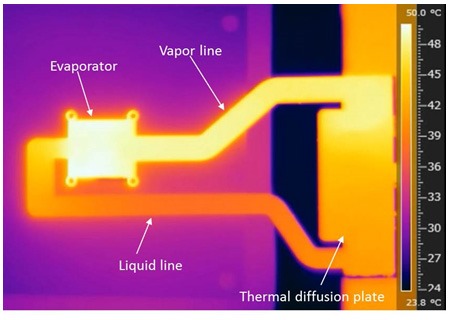
Liquid Cooling plate for Smart Phone. It is about four inches long by two inches wide by one millimeter thick. The top of the scale and the bright spot in the picture is about 120 degrees Fahrenheit. It's not solid, it's full of tiny tunnels filled with liquid and gas.
If whatever kind of machine your have is running so hot that you need to take steps to keep it cool, it just means your machine is not very efficient, energy wise. Automobile engines, for instance, in spite of all the recent advances in fuel economy, are still only able to covert about one third of the energy available in a gallon of gasoline into useful motion. The rest of it gets turned into heat. About half of that waste heat gets sent out the exhaust pipe. The rest is why you have a radiator, water pump, hoses and all the bits that go with them. And anti-freeze, don't forget the antifreeze.
    Microprocessors are amazing devices. They consume electricity and turn it into smart. And heat. If your processor isn't very complex, say it has only a million gates, and is only running at one billion cycles a second, the amount of heat it generates might make it a little warm, but it's not going to get hot. Take a more complex processor, one with, say, a zillion gates and run it at several gigahertz, and it's going to get hot, maybe even hot enough to make trouble.
     Chip manufacturers have been able to partially mitigate this by reducing the size of the gates (which means you don't need as much electricity to trigger them) and decreasing the operating voltage (same thing). But the number of gates is going up much faster than these techniques can handle, so improved cooling is what we need, and liquid cooling fits the bill.
 
Dustbury got me started with a post about liquid cooling for smart phones. In looking around, I uncovered this little bit on ZDNET:
. . . the Samsung Galaxy S7 isn't the first smartphone to feature liquid cooling. Microsoft's Lumia 950 and Lumia 950xl both use liquid cooling. Sony's use of the technology goes further back, to the Xperia X2, which was released in March of 2014.
Why use liquid cooling? It's probably being used for a number of reasons. First, Qualcomm had problems with the Snapdragon 810 overheating, a problem that resulted in Samsung passing up on the chip for the Galaxy S6 and S6 Edge

Tuesday, November 10, 2015

Rooftop Refuge

Professor Zhang Lin's mountain villa built on top of a Beijing apartment block.
I'm reading Mona Lisa Overdrive and I come across this scene where Mona is looking out a window of a high-rise in the Sprawl (New York City) and she sees this wild landscape built on top of the building across the way. There are rocks and hills and trees and even a mountain goat climbing around and nibbling on the shrubbery, and I think I've seen that before, but where? Or maybe I didn't see it, I just constructed an image in my mind the last time I read this book. What a minute, have I read this book before? I could have, it was written over 25 years ago, but I don't think so.
     But I do remember seeing this and I think it was a real place in China. A little Google and here we are. The doc who built it got an order to tear it down a couple of years ago, so it's probably gone by now, but it was very cool while it lasted.

Smart Phone Zombies
    A key element of the story in the book revolves around people operating virtual lives in cyber space. The New York Times just passed out a bunch of free cardboard widgets that turn your smart phone into a virtual reality viewer (essentially 3-D stereo). I'm pretty sure looking at smart phone that is a couple of inches from your eyes for very long is going to mess with your vision. Might be so bad that the smart phone zombies will start wearing a camera as well so they can where they are going when they need to walk around.

Friday, October 23, 2015

Smart Phone Remote Control

With the supposed proliferation of internet connected appliances (I haven't actually seen one), a smart phone could be your remote control for just about everything in your house, like your TV, thermostat and lights. The big advantages are that you would be able to read the labels on whatever you were trying to control, and you would only need one remote to control everything.

    The downside of smart phones is their high cost and the high monthly service fees. Can't have a smart phone without a multi-giga-byte data pack, for which they want to charge you a bucket of money. If you just want to use it to control stuff in your house, you can just use wifi and dispense with cell phone service. Of course then you have to pay full price for the smart phone which makes it even more expensive.
    Problem with smart phones is they don't have a real keypad, only a virtual one, so you have to look at it to operate it. No being able to locate the mute button by feel. The other problem is they take two hands to operate, one to hold it and one to push the virtual buttons. I could be wrong about this, I don't have a smart phone. Perhaps people who are familiar with them will have memorized the necessary contortions and can operate them without looking.
    I was thinking what we need is a device that you could hold in one hand and would have a set of keys/buttons, at least one for each finger. The trick would be to hold onto it while operating the keys, which means at least a couple of keys are always going to have to be depressed. Alternatively, you could put a strap on the back that would go around your hand. Maybe add an automatic tether so that when you drop it, it automatically gets reeled in and held someplace convenient, like your waist, belly or chest, or your back, if you're a Ninja. If you don't need to see the screen you can operate it from it's stored position.
    If you wanted to be fancy, you could employ a drone to carry it around for you. Simply raise your hand and snap your fingers and the drone would zip over and deposit your remote control right in your hand. Drop it and the drone would reel it in and hold it in readiness for your next command. Drones are a little noisy, so maybe a blimp drone would work better.

Friday, September 11, 2015

A Perfect Tempest in a Teapot

The ocean has gone plaid!!!
Older son got a ticket from the Transit Police last night. His job provides him with a free Tri-Met pass, and since everything is an App these days, he's got it in his Smart Phone. Since it's now so-much-more-convenient, the cops need a scanner to tell whether his pass is valid, and the scanner said "no, not a valid pass", so the copper wrote him a ticket and now he has a date with the court. Count up another win for the petty fascists. Just one more reason why I'm glad I don't carry a smart-phone.

Friday, November 1, 2013

How to email a text message to a cell phone.

My next virtual ninja-assassin girlfriend.

My kids all make extensive use of the text service on their cell phones, so much so that we pay the $10 a month per phone for unlimited use. Sending a text also seems to be a more reliable method of contacting them. No one ever seems to answer their cell phone, but somehow text messages manage to get through. A while back I figured out how to send a text message to a cell phone using email. To do this you need two pieces of information: the phone number and the domain name of their carrier. It used to be that simply having the phone number would be enough to identify the carrier, but then portability came along, so that is no longer a sure fire method. There are services available that will identify the current carrier right now, but all the ones I have found so far seem to be geared to high volume customers, i.e. $12 a month and six cents per inquiry. I just want one, and no I'm not going to pay anything for this piece of information. I mean I could just ask my daughter who she signed up with, but that would be cheating if I'm writing a how-to article.

Search Bug will look up a phone number for you and tell you who the carrier is with this caveat: 
The phone type and carrier identified above are only correct if the number was never transfered, sold, ported or changed. Shown information represents original phone number assignment. Therefore, the above report may not be accurate as of today.
I looked up a number and got back this piece of information: 


Carrier* (not verified):T MOBILE (OCN: 6529) 

T MOBILE, I know who that is, but what's this OCN stuff? Wikipedia answers that one:
OCN - Operating company number, in telephony, a code assigned by the National Exchange Carrier Association (NECA) to telecommunications carriers (including landline, wireless carriers, and resellers of various types). Also known as a «NECA Company Code».
Well, I'm sure that's very interesting, but it's useless as far as what we are trying to do. Let's move on. Now we know the carrier we need the domain name. On email text messages I found this

T-Mobile

  • 10digitphonenumber@tmomail.net
So now I create a new contact, call it daughter Text. I combine her phone number with the T-mobile suffix tmomail.net and store it as her email address. Creating a new contact is the only way I found that I could reliably send text messages to a list of cell phone users. If I just add this address as another email address to an existing contact, there doesn't seem to be anyway to tell Gmail which address to use.
     If you have read this far you might be wondering why I needed to look up my daughter's carrier if I'm paying her text messaging bill. Well, she's gotten independent and bought herself a smart phone. I'll pay the fee for texting, but I'm not going to pay the $50 or whatever it is that Verizon charges for a smart phone data pack. She wasn't impressed by Verizon's prices either, so she shopped around and picked T-Mobile.

Update: Got a confirmation by return text, but the domain was now brightspotmobile.net and the phone number had a 1 in front of it.


Monday, September 23, 2013

BikeOTB


A friend of mine is making a foray into appland with a smart phone app for bicyclists. This is a perfect example of why Paul has a job and I don't. He has his finger on the pulse of the modern consumer, he has enthusiasm, he's well mannered and polite. I came from the school of microcode where the computer executed the opcodes that I told it to execute, and anyone who disagrees is (obviously) a doomkoff.. Ve didn't need no fancy-schmancy pictures and diagrams. Vhy vould anyone need any such nonsense? It has nothing to do with getting the job done. All hail machine code! Death to Windows! The mainframe will prevail! You get the picture.

Meanwhile Paul is keeping pace with the modern world, and maybe even leading the way.


Paul is an avid cyclist and he sees where a smart-phone app might be a handy thing to have. The question is whether anyone else would agree, so he is floating this idea out into the crowd sourcing cloud to find that out.

Friday, January 27, 2012

3G vs 4G


3G refers to third generation cellular telephone data transmission techniques, and 4G refers to, you guessed it, fourth generation. A new generation appears about every ten years or so. 4G started appeared a year or two ago. 4G is roughly ten times as fast as 3G. That's nice. Why do I care? I don't even have a cell phone. I don't really, but it might upset the aircraft instrumentation apple cart, at least for private airplanes. I realize that in the grand scheme of things, it is not really a very big apple cart, but it is a bit of a revolution, technology wise.  

BBFlight has an app for your tablet that can provide not just navigation aids in the form of maps, but also some basic aircraft instrumentation like compass, altimeter, artificial horizon, and airspeed indicator. I was a bit nonplussed when Marc told me about this today at lunch. How could it possible maintain an artificial horizon? I know smart phones have accelerometers that allow them to tell what angle they are at, but that isn't going to help in an airplane. When making a properly banked turn in an airplane, down is going to be down relative to the aircraft, not the earth. Artificial horizons use gyroscopes as a reference. Gyroscopes on gymbals maintain their orientation regardless of which way "down" appears to be.

Seems BBFlight's software is doing inertial navigation. It watches the accelerometer constantly, and can tell when you turn or bank or change speed either horizontally or vertically. It starts on the ground and keeps track of every move you make, and by keeping a running summation of these moves, it can tell where you are and what angle you are at. Commercial aircraft using similar technology can fly from New York to London and know their location to within six feet.

Tablets not only have cell phone connections, but they also have GPS, which can tell you where you are, so the program can compare the location it has determined inertially with what the GPS tells it.

We can determine speed using our old friend "rate times time equals distance". If you know where you were five minutes (or five seconds) ago, and you know where you are now, it is a simple matter to compute your velocity. Of course, this is land based velocity, not your airspeed, which could be substantially different. You probably will still want to have a real airspeed indicator.

GPS can also tell you your altitude. So you can do away with your altimeter, which is probably wrong anyway being as it is based on air pressure, which is always changing.

So what's this all got to do with 4G cellphone communications? This same program from BBFlight can also display maps on your tablet. As you fly along, the maps are updated on the fly, so to speak. If you are flying in a circle looking for a place to land, like an airport, a tablet that only has 3G communications can't keep up. You get a map, but you are turning, so it needs to update the map, and by the time it has the update, you have turned even more so what you are seeing is a very jerky video. With 4G the map rotation is perfectly smooth.

Rumor has it you can get cell phone coverage all the way from San Francisco to Portland (Oregon). I expect it's good anywhere along the I-5 corridor. 100 miles East it might be a different story.

As for the apple cart: this program will run on an iPad or any Android tablet. The aircraft instruments they replace cost thousands of dollars. It will be a while, probably a long while, before this tablet type instrumentation is accepted by the aviation community, and probably even longer before the FAA approves it, but it will happen.

Update November 2021 replaced missing image.


Monday, January 9, 2012

Useful Smart Phone App


Me neighbor works for the county occasionally building bridges and stuff. He showed me this smart phne app that let's you use your phone as a level. You can you use it any which way: lay it down flat, on edge, or standing up, and it will show you just how flat or level or plumb things are. I was doubly shocked when I saw this. One, because it was something useful you can do with a smart phone, and two, I had been looking for something like this a long time ago and couldn't figure out how to do it.

Back when I used to ride my bicycle I thought it would be cool if there was some kind of gadget that could tell you how steep, or flat, the road you were riding on was. Sometimes you are sailing along and you think the road is flat, which makes you think that you are pretty tough, but what if it is actually an imperceptible downgrade? That would take some starch out of your sails. Or you are grinding along on some road that looks flat, but geez, this is a lot of work. Maybe you are actually going uphill. And how about when you come to an actual hill? Something like this could tell you just how steep it is. Anyway, I thought a gadget that could tell you this would be pretty cool, but I could never figure out how it could be done.

I was talking to Jack about this and our conclusion is that this is an outgrowth of the freefall sensors that go into laptop computers to protect the hard drive in case you drop it. Freefall sensors are actually 3-D accelerometers. When your laptop is sitting on the table, it is subject to the force of gravity, which as we all know (don't we?) is indistinguishable from acceleration, which is really weird when you think about it. Basically we have a lever sticking out horizontally and supported at one end. The force of gravity is pulling on our lever, and since one end is unsupported, it is causing it to bend. A strain gauge measures how much it is bending.

When you drop your laptop, the force of gravity is no longer bending the lever, the strain gauge registers the absense of strain, which tells the laptop's little computer brain that we are falling (or we are in orbit). This prompts the computer to retract the heads on the hard disk so that when we hit floor the heads are held securely and away from the disk surface so they don't collide and get all eff-ed up. All this takes milliseconds, a fraction of the time it takes the laptop to fall to the floor. Well, if you drop it from a table. If you drop it from a lower height, like a couple of inches, you might be able to defeat this protection mechanism and screw up your hard disk.

Anyway, some whiz kids came up with the accelerometers, and somebody thought it would be a good idea to include it in a smart phone. It's just one more component, it probably costs less than a buck, it might turn out to be handy, and who knows? Maybe there will be hard drives in smart phones one of these days. And presto, here we are with a really useful little engine.
The device at the bottom left with the C-shaped wings is an accelerometer
This is the only picture I found of an accelerometer, and I don't even know whether it is typical or not.

Update January 2020 replaced missing image.